How I find music to DJ with using Soulseek
Most DJs get music from a few places. Beatport is good for regular EDM, and record pools are good for Top 40 remixes and mashups. But the tracks that make a set feel like yours are often the ones you can’t buy: rare promos, IDs, and edits that never got a release. For those, I use Soulseek.
Soulseek is a peer-to-peer network where people share their own music libraries, so it has tracks you can’t find anywhere else. Here’s how I set it up and use it.
Install Nicotine+
Nicotine+ is a free Soulseek client for Mac, Windows, and Linux. Download it from nicotine-plus.org, or on a Mac, install it with Homebrew:
brew install nicotine-plus
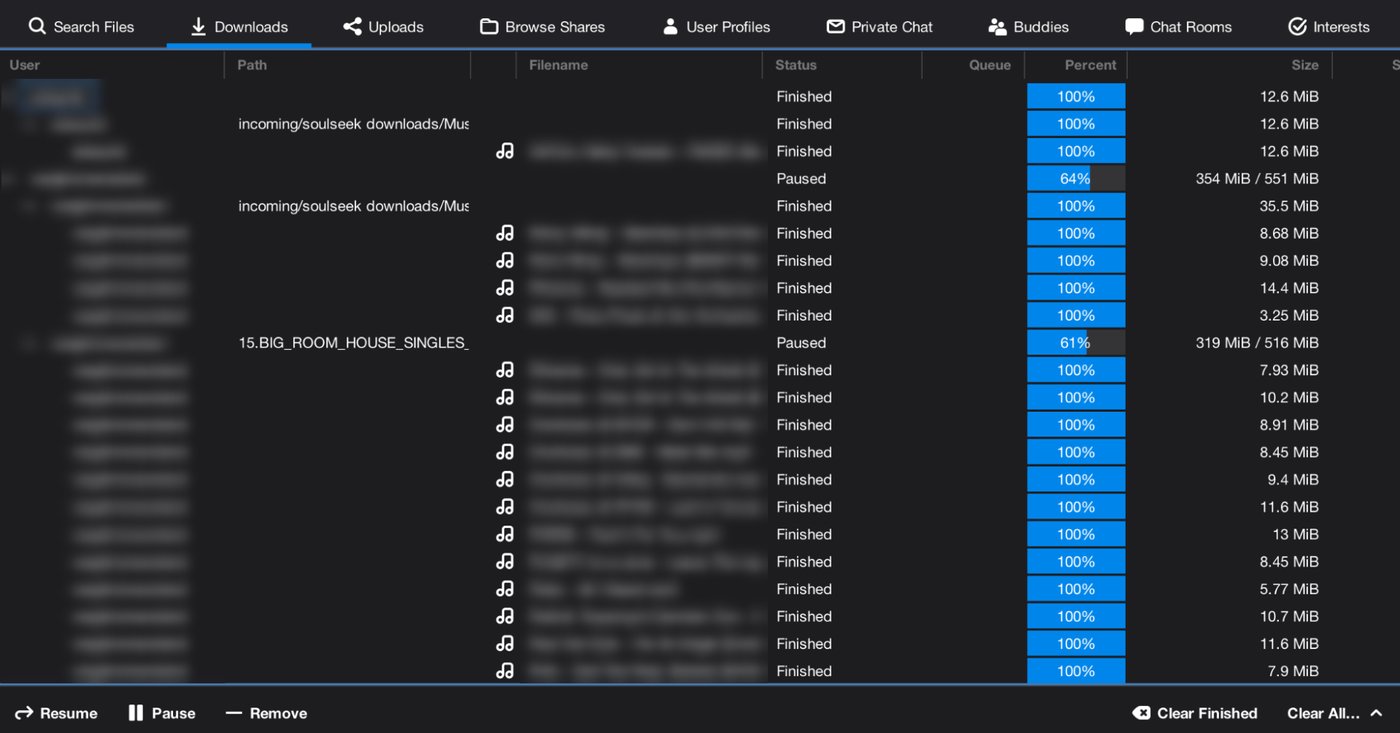
Here’s what it looks like with a batch of downloads:
One-time setup
- Set your download folder. In Preferences → Downloads, point both the download and incomplete folders to a place that makes sense for you. I put mine in
~/Music/Soulseek downloads. - Share something. In Preferences → Shares, add a folder of music, such as your organized DJ library. This is necessary since some users won’t let you download if you share nothing, and some rooms auto-ban leechers.
- Check connectivity. In Preferences → Network, leave UPnP on, or forward the listening port shown there on your router. If people can’t connect to you, downloads stall at “Queued” more often.
Searching for tracks
- Search artist, title, and mix name, like
artist trackname original mixorextended mixorhouse mix. Electronic tracks come in many versions, and you want the full-length club version, not the radio edit. - Exclude junk with a minus sign:
artist trackname -radio -edit -live - Use the filter bar above the results:
- File type:
flac,aiff,wav, ormp3 - Bitrate: set a minimum of
320for MP3s - Free slot: only show users who can send right away
- Length: a club track is usually 6–8 minutes, so a 3:30 file is probably a radio edit
- File type:
- Get exact titles from Beatport or Discogs. Copy the precise title and mix name, then search with that. Exact naming finds better files.
- Download whole folders for releases and EPs. Right-click → Download folder keeps the tracks together with the artwork.
Discovering new music
- Browse users with good taste. When someone has a great track, right-click → Browse Files. People who share deep house or progressive trance tend to have whole libraries of it, organized by label. This is how you find tracks you didn’t know to search for.
- Use wishlists for hard-to-find tracks. Nicotine+ re-searches them periodically and lets you know when someone shares one.
- Join rooms. Search the room list for “house,” “techno,” “trance,” or “DJ.” They’re good for asking about rare promos and IDs.
Checking file quality
- Lossless (FLAC, AIFF, WAV) is best. A 7-minute track should be roughly 40–80 MB.
- A 320 kbps MP3 is fine for club play. It’s about 2.4 MB per minute, so a 7-minute track is roughly 16–17 MB. If a “320” file is much smaller than that, it’s mislabeled.
- Avoid anything below 320. 128–192 kbps files can sound harsh and thin on big speakers, especially the hi-hats and cymbals in house and techno.
- Watch for fakes. Some “FLACs” are just upconverted MP3s. Install Spek (on a Mac,
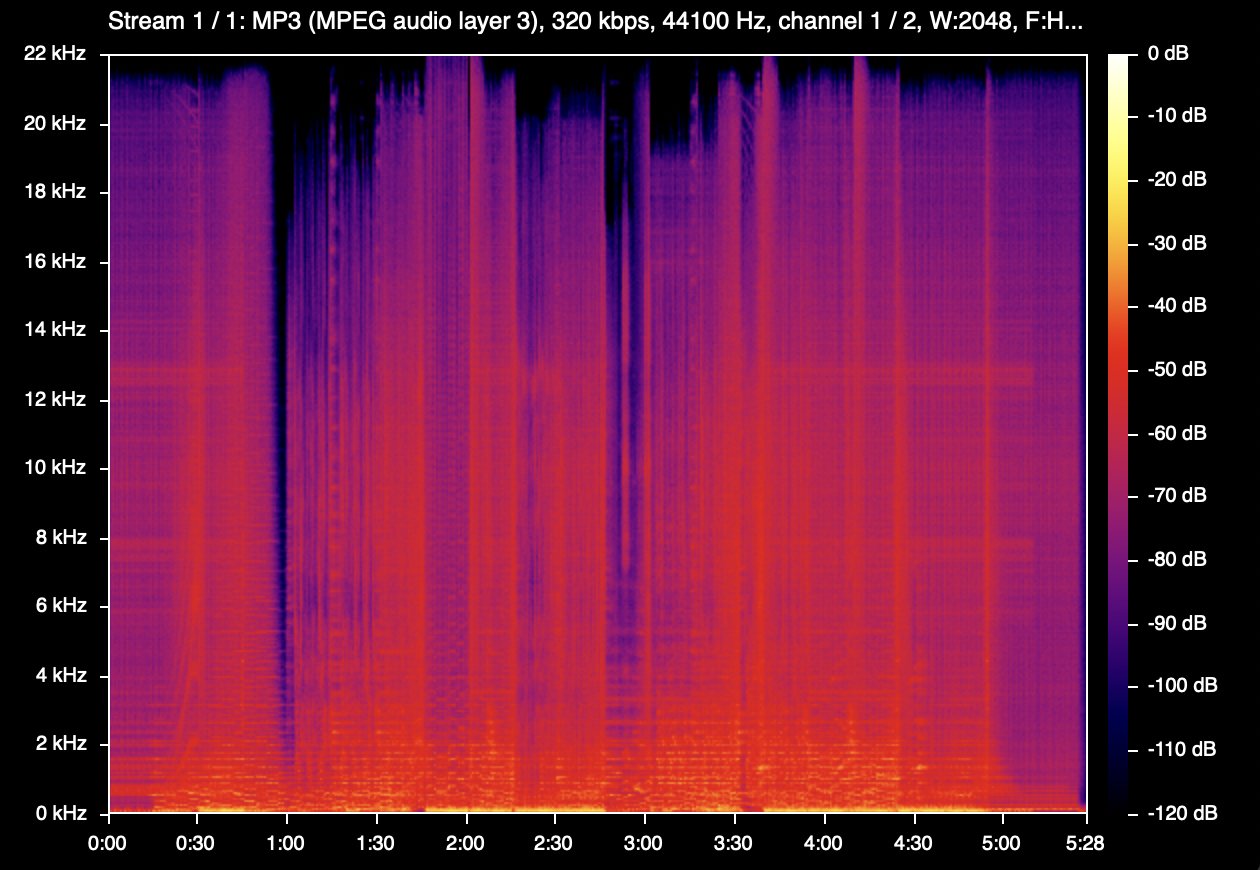
brew install --cask spek), open it, and drag the file in. A genuine file has frequency content up to about 20 kHz or higher for most of the track. A hard cutoff around 16 kHz means it was made from a low-quality MP3.
Here’s a genuine 320 MP3 in Spek. It reaches 20–21 kHz for most of the track:
Do you need lossless?
No. At venues under 200 people, nobody, including you, will hear the difference between a 320 MP3 and lossless on a club sound system. Plenty of working DJs play 320s at much bigger shows. Lossless is worth grabbing when it’s easy to find, and for tracks you’ll play constantly, but it’s not worth chasing for every track.
If you do get lossless, AIFF beats WAV for rekordbox, because WAV handles tags and artwork poorly. On a Mac, you can convert FLAC to AIFF for free with XLD.
One practical thing to watch: if you play on venue CDJs, check which formats they support. MP3 and AIFF play on basically everything. FLAC works on newer Pioneer gear, but some older CDJs can’t read it. Sticking to MP3 and AIFF means you’ll never get caught out mid-set.
Organizing your library
- Treat your downloads folder as an inbox. After you’ve checked quality and fixed tags, move tracks into your organized library and import them into rekordbox or Serato.
- Tag files as Artist – Title (Mix Name), plus the label. You’ll thank yourself mid-set.
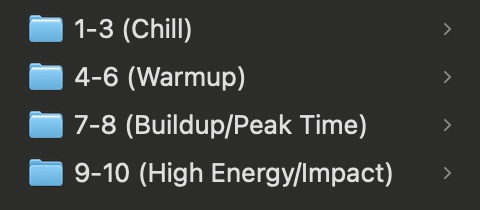
I sort my library into folders by energy, from 1 to 10, and choose the buckets by feel. It’s very subjective, and the way you organize your tracks has a big impact on how your mix ends up sounding. Everyone will do it differently, and that’s a good thing.
Is Soulseek safe and legal?
Soulseek itself is legal, but most of what people share on it is copyrighted music, and downloading or sharing that without permission is copyright infringement in most countries. Use your judgment, and buy the tracks you end up playing a lot, on Beatport or Bandcamp. It supports the artists, and you get a clean, properly tagged file.
As for safety, stick to audio files, and be wary of anything that isn’t one, like an app or a zip claiming to be an album. Like any peer-to-peer network, the people you connect with can see your IP address.
I DJ as Max Control. Hear my mixes on SoundCloud, or see more on my homepage.